manydist: distance-based learning with mixed-type data
1 Overview
manydist provides tools for constructing dissimilarities for numerical, categorical, and mixed-type data.
The main function is mdist(). It computes a dissimilarity object that can be used in distance-based learning workflows, including clustering, nearest-neighbour prediction, and diagnostic analyses.
The package supports both preset specifications and custom specifications. In the current interface:
-
method_catcontrols the categorical dissimilarity; -
method_numcontrols the preprocessing of numerical variables; -
commensurablecontrols whether variable-wise contributions are placed on a comparable scale; -
presetselects a predefined distance specification.
The numerical metric is no longer a user-facing argument. For most presets, numerical variables are compared through Manhattan-type contributions. The exceptions are presets such as "hl" and "euclidean", where the Euclidean structure is part of the definition.
The "euclidean" preset replaces the former "euclidean_onehot" name. It computes Euclidean distances after one-hot encoding categorical variables.
2 Setup
We use the palmerpenguins data for illustration.
if (requireNamespace("palmerpenguins", quietly = TRUE)) {
  data("penguins", package = "palmerpenguins")

  penguins_small <- palmerpenguins::penguins |>
    dplyr::select(
      species,
      bill_length_mm,
      bill_depth_mm,
      flipper_length_mm,
      body_mass_g,
      island,
      sex
    ) |>
    tidyr::drop_na()
}
The data contain numerical variables, such as bill length and body mass, and categorical variables, such as island and sex.
dplyr::glimpse(penguins_small)Rows: 333
Columns: 7
$ species <fct> Adelie, Adelie, Adelie, Adelie, Adelie, Adelie, Adel…
$ bill_length_mm <dbl> 39.1, 39.5, 40.3, 36.7, 39.3, 38.9, 39.2, 41.1, 38.6…
$ bill_depth_mm <dbl> 18.7, 17.4, 18.0, 19.3, 20.6, 17.8, 19.6, 17.6, 21.2…
$ flipper_length_mm <int> 181, 186, 195, 193, 190, 181, 195, 182, 191, 198, 18…
$ body_mass_g <int> 3750, 3800, 3250, 3450, 3650, 3625, 4675, 3200, 3800…
$ island <fct> Torgersen, Torgersen, Torgersen, Torgersen, Torgerse…
$ sex <fct> male, female, female, female, male, female, male, fe…3 Computing a mixed-type dissimilarity
The simplest way to compute a mixed-type dissimilarity is to use a preset.
For example, the "gower" preset computes a Gower-type dissimilarity for mixed numerical and categorical data.
MDist object
  preset : gower
  number of observations : 333
  number of continuous variables   : 4
  number of categorical variables   : 2
  parameters:
    - commensurability adjustment: FALSE
The resulting object stores the dissimilarity matrix and metadata about the distance specification.
class(d_gower)[1] "MDist" "R6" The distance matrix can be extracted with to_dist().
as.matrix(d_gower$to_dist())[1:5, 1:5] 1 2 3 4 5
1 0.00000000 0.21132367 0.25052445 0.24090408 0.06896389
2 0.21132367 0.00000000 0.06763994 0.09064582 0.24961473
3 0.25052445 0.06763994 0.00000000 0.06252081 0.25695739
4 0.24090408 0.09064582 0.06252081 0.00000000 0.22595173
5 0.06896389 0.24961473 0.25695739 0.22595173 0.000000004 Response-aware dissimilarities
Some categorical dissimilarities can use a response variable. When a response is supplied to mdist(), it is used for response-aware distance construction and is removed from the predictors.
Therefore, in the following example, species is used as the response and is not also treated as a predictor.
d_response <- mdist(
  penguins_small,
  response = species,
  preset = "u_dep"
)

d_response
MDist object
preset : u_dep
number of observations : 333
number of continuous variables : 4
number of categorical variables : 2
parameters:
- categorical method: tvd
- numerical preprocessing: pc_scores
- commensurability adjustment: TRUEThe same can be written by passing the response as a character string.
d_response_chr <- mdist(
  penguins_small,
  response = "species",
  preset = "u_dep"
)

d_response_chr
MDist object
preset : u_dep
number of observations : 333
number of continuous variables : 4
number of categorical variables : 2
parameters:
- categorical method: tvd
- numerical preprocessing: pc_scores
- commensurability adjustment: TRUE5 Custom distance specifications
Presets are convenient, but users can also define custom specifications.
In a custom specification, method_cat controls the categorical dissimilarity and method_num controls the preprocessing applied to numerical variables.
d_custom <- mdist(
  penguins_small |> dplyr::select(-species),
  preset = "custom",
  method_cat = "matching",
  method_num = "std",
  commensurable = TRUE
)

d_custom
MDist object
preset : custom
number of observations : 333
number of continuous variables : 4
number of categorical variables : 2
parameters:
- categorical method: matching
- numerical preprocessing: std
- commensurability adjustment: TRUE
- number of principal components: 6
- inertia threshold: NULLHere, categorical variables are compared using matching dissimilarities, numerical variables are standardized, and variable-wise contributions are made commensurable.
A response-aware custom specification can also be used.
d_custom_response <- mdist(
  penguins_small,
  response = species,
  preset = "custom",
  method_cat = "tvd",
  method_num = "std",
  commensurable = TRUE
)

d_custom_response
MDist object
preset : custom
number of observations : 333
number of continuous variables : 4
number of categorical variables : 2
parameters:
- categorical method: tvd
- numerical preprocessing: std
- commensurability adjustment: TRUE
- number of principal components: 6
- inertia threshold: NULLIf only one categorical predictor is available, methods that require more than one categorical variable may switch to a simpler alternative internally.
6 Euclidean preset
The "euclidean" preset computes Euclidean distances after converting categorical variables to one-hot dummy variables.
MDist object
  preset : euclidean
  number of observations : 333
  number of continuous variables   : 4
  number of categorical variables   : 2
  parameters:
    - numerical preprocessing: std
This preset replaces the former "euclidean_onehot" name.
7 Comparing presets
Different presets encode different assumptions about how numerical and categorical variables should contribute to the final dissimilarity.
d_u_indep <- mdist(
  penguins_small |> dplyr::select(-species),
  preset = "u_indep"
)

d_u_mix <- mdist(
  penguins_small |> dplyr::select(-species),
  preset = "u_mix"
)

d_hl <- mdist(
  penguins_small |> dplyr::select(-species),
  preset = "hl"
)

d_u_indep
MDist object
preset : u_indep
number of observations : 333
number of continuous variables : 4
number of categorical variables : 2
parameters:
- categorical method: matching
- numerical preprocessing: std
- commensurability adjustment: TRUE
d_u_mixMDist object
preset : u_mix
number of observations : 333
number of continuous variables : 4
number of categorical variables : 2
parameters:
- categorical method: tvd
- numerical preprocessing: std
- commensurability adjustment: TRUE
d_hlMDist object
preset : hl
number of observations : 333
number of continuous variables : 4
number of categorical variables : 2
parameters:
- categorical method: HLeucl
- numerical preprocessing: std
- commensurability adjustment: FALSEThe available presets include:
c(
  "custom",
  "gower",
  "euclidean",
  "unbiased_dependent",
  "u_dep",
  "u_indep",
  "u_mix",
  "hl",
  "gudmm",
  "dkss",
  "mod_gower"
)
[1] "custom" "gower" "euclidean"
[4] "unbiased_dependent" "u_dep" "u_indep"
[7] "u_mix" "hl" "gudmm"
[10] "dkss" "mod_gower" Some presets are intended mainly for train-train dissimilarities and may not support distances from new observations to training observations.
8 Distances from new observations to training observations
mdist() can also compute distances from new observations to the training observations through the new_data argument.
set.seed(123)

split_id <- sample(seq_len(nrow(penguins_small)), size = floor(0.75 * nrow(penguins_small)))

penguins_train <- penguins_small[split_id, ]
penguins_test  <- penguins_small[-split_id, ]

d_new <- mdist(
  x = penguins_train |> dplyr::select(-species),
  new_data = penguins_test |> dplyr::select(-species),
  preset = "gower"
)

d_new
MDist object
preset : gower
number of training observations : 249
number of test observations : 84
number of continuous variables : 4
number of categorical variables : 2
parameters:
- commensurability adjustment: FALSEThe resulting dissimilarity is rectangular: rows correspond to test observations and columns correspond to training observations.
9 Using manydist in recipe workflows
The function step_mdist() provides a recipe interface to mdist(). It replaces selected predictors with a distance-based representation.
In supervised workflows, the response is defined on the left-hand side of the recipe formula. Therefore, when we select recipes::all_predictors(), the response variable is not used as a predictor in the distance computation.
rec <- recipes::recipe(species ~ ., data = penguins_small) |>
  step_mdist(
    recipes::all_predictors(),
    preset = "gower",
    output = "distance_to_training"
  )

rec_prep <- recipes::prep(rec, training = penguins_small)

baked <- recipes::bake(rec_prep, new_data = penguins_small)

baked |>
  dplyr::slice_head(n = 5)
# A tibble: 5 × 334
species dist_1 dist_2 dist_3 dist_4 dist_5 dist_6 dist_7 dist_8 dist_9 dist_10
<fct> <dbl> <dbl> <dbl> <dbl> <dbl> <dbl> <dbl> <dbl> <dbl> <dbl>
1 Adelie 0 0.211 0.251 0.241 0.0690 0.192 0.101 0.229 0.0832 0.153
2 Adelie 0.211 0 0.0676 0.0906 0.250 0.0338 0.278 0.0527 0.262 0.331
3 Adelie 0.251 0.0676 0 0.0625 0.257 0.0694 0.271 0.0518 0.277 0.324
4 Adelie 0.241 0.0906 0.0625 0 0.226 0.0851 0.250 0.103 0.238 0.273
5 Adelie 0.0690 0.250 0.257 0.226 0 0.251 0.0820 0.281 0.0259 0.0957
# ℹ 323 more variables: dist_11 <dbl>, dist_12 <dbl>, dist_13 <dbl>,
# dist_14 <dbl>, dist_15 <dbl>, dist_16 <dbl>, dist_17 <dbl>, dist_18 <dbl>,
# dist_19 <dbl>, dist_20 <dbl>, dist_21 <dbl>, dist_22 <dbl>, dist_23 <dbl>,
# dist_24 <dbl>, dist_25 <dbl>, dist_26 <dbl>, dist_27 <dbl>, dist_28 <dbl>,
# dist_29 <dbl>, dist_30 <dbl>, dist_31 <dbl>, dist_32 <dbl>, dist_33 <dbl>,
# dist_34 <dbl>, dist_35 <dbl>, dist_36 <dbl>, dist_37 <dbl>, dist_38 <dbl>,
# dist_39 <dbl>, dist_40 <dbl>, dist_41 <dbl>, dist_42 <dbl>, …The resulting data contain the outcome variable, species, together with one distance column for each training observation. These columns are named dist_1, dist_2, and so on.
10 Custom specifications in recipes
The same interface can be used with a custom distance specification.
rec_custom <- recipes::recipe(species ~ ., data = penguins_small) |>
  step_mdist(
    recipes::all_predictors(),
    preset = "custom",
    method_cat = "matching",
    method_num = "std",
    commensurable = TRUE,
    output = "distance_to_training"
  )

rec_custom_prep <- recipes::prep(rec_custom, training = penguins_small)

baked_custom <- recipes::bake(rec_custom_prep, new_data = penguins_small)

baked_custom |>
  dplyr::slice_head(n = 5)
# A tibble: 5 × 334
species dist_1 dist_2 dist_3 dist_4 dist_5 dist_6 dist_7 dist_8 dist_9 dist_10
<fct> <dbl> <dbl> <dbl> <dbl> <dbl> <dbl> <dbl> <dbl> <dbl> <dbl>
1 Adelie 0 3.01 3.93 3.73 1.55 2.57 2.31 3.47 1.87 3.56
2 Adelie 3.01 0 1.56 2.11 3.87 0.779 4.55 1.25 4.14 5.84
3 Adelie 3.93 1.56 0 1.50 4.07 1.60 4.45 1.18 4.55 5.73
4 Adelie 3.73 2.11 1.50 0 3.40 1.96 4.00 2.42 3.66 4.49
5 Adelie 1.55 3.87 4.07 3.40 0 3.90 1.90 4.61 0.605 2.30
# ℹ 323 more variables: dist_11 <dbl>, dist_12 <dbl>, dist_13 <dbl>,
# dist_14 <dbl>, dist_15 <dbl>, dist_16 <dbl>, dist_17 <dbl>, dist_18 <dbl>,
# dist_19 <dbl>, dist_20 <dbl>, dist_21 <dbl>, dist_22 <dbl>, dist_23 <dbl>,
# dist_24 <dbl>, dist_25 <dbl>, dist_26 <dbl>, dist_27 <dbl>, dist_28 <dbl>,
# dist_29 <dbl>, dist_30 <dbl>, dist_31 <dbl>, dist_32 <dbl>, dist_33 <dbl>,
# dist_34 <dbl>, dist_35 <dbl>, dist_36 <dbl>, dist_37 <dbl>, dist_38 <dbl>,
# dist_39 <dbl>, dist_40 <dbl>, dist_41 <dbl>, dist_42 <dbl>, …In this example, method_cat = "matching" specifies the categorical dissimilarity, while method_num = "std" specifies standardization of numerical variables.
11 Pairwise dissimilarities in recipes
For distance-based clustering workflows, step_mdist() can return the within-training pairwise dissimilarity matrix by setting output = "pairwise".
In this case, the recipe is intended for training-only workflows.
penguins_predictors <- penguins_small |>
  dplyr::select(-species)

rec_pairwise <- recipes::recipe(~ ., data = penguins_predictors) |>
  step_mdist(
    recipes::all_predictors(),
    preset = "gower",
    output = "pairwise"
  )

rec_pairwise_prep <- recipes::prep(rec_pairwise, training = penguins_predictors)

pairwise_dist <- recipes::bake(
  rec_pairwise_prep,
  new_data = penguins_predictors
)

pairwise_dist |>
  dplyr::slice_head(n = 5)
# A tibble: 5 × 333
dist_1 dist_2 dist_3 dist_4 dist_5 dist_6 dist_7 dist_8 dist_9 dist_10 dist_11
<dbl> <dbl> <dbl> <dbl> <dbl> <dbl> <dbl> <dbl> <dbl> <dbl> <dbl>
1 0 0.211 0.251 0.241 0.0690 0.192 0.101 0.229 0.0832 0.153 0.213
2 0.211 0 0.0676 0.0906 0.250 0.0338 0.278 0.0527 0.262 0.331 0.0330
3 0.251 0.0676 0 0.0625 0.257 0.0694 0.271 0.0518 0.277 0.324 0.0755
4 0.241 0.0906 0.0625 0 0.226 0.0851 0.250 0.103 0.238 0.273 0.0645
5 0.0690 0.250 0.257 0.226 0 0.251 0.0820 0.281 0.0259 0.0957 0.255
# ℹ 322 more variables: dist_12 <dbl>, dist_13 <dbl>, dist_14 <dbl>,
# dist_15 <dbl>, dist_16 <dbl>, dist_17 <dbl>, dist_18 <dbl>, dist_19 <dbl>,
# dist_20 <dbl>, dist_21 <dbl>, dist_22 <dbl>, dist_23 <dbl>, dist_24 <dbl>,
# dist_25 <dbl>, dist_26 <dbl>, dist_27 <dbl>, dist_28 <dbl>, dist_29 <dbl>,
# dist_30 <dbl>, dist_31 <dbl>, dist_32 <dbl>, dist_33 <dbl>, dist_34 <dbl>,
# dist_35 <dbl>, dist_36 <dbl>, dist_37 <dbl>, dist_38 <dbl>, dist_39 <dbl>,
# dist_40 <dbl>, dist_41 <dbl>, dist_42 <dbl>, dist_43 <dbl>, …12 Euclidean distances in recipes
The "euclidean" preset can also be used inside a recipe. Categorical predictors are one-hot encoded internally before the Euclidean distance is computed.
rec_euclidean <- recipes::recipe(species ~ ., data = penguins_small) |>
  step_mdist(
    recipes::all_predictors(),
    preset = "euclidean",
    output = "distance_to_training"
  )

rec_euclidean_prep <- recipes::prep(rec_euclidean, training = penguins_small)

baked_euclidean <- recipes::bake(rec_euclidean_prep, new_data = penguins_small)

baked_euclidean |>
  dplyr::slice_head(n = 5)
# A tibble: 5 × 334
species dist_1 dist_2 dist_3 dist_4 dist_5 dist_6 dist_7 dist_8 dist_9 dist_10
<fct> <dbl> <dbl> <dbl> <dbl> <dbl> <dbl> <dbl> <dbl> <dbl> <dbl>
1 Adelie 0 2.92 3.09 3.02 1.17 2.87 1.59 2.98 1.46 2.07
2 Adelie 2.92 0 0.997 1.28 3.28 0.477 3.29 0.856 3.44 3.69
3 Adelie 3.09 0.997 0 0.975 3.18 1.14 3.44 0.963 3.36 3.69
4 Adelie 3.02 1.28 0.975 0 2.96 1.23 3.25 1.45 3.04 3.24
5 Adelie 1.17 3.28 3.18 2.96 0 3.23 1.42 3.32 0.386 1.41
# ℹ 323 more variables: dist_11 <dbl>, dist_12 <dbl>, dist_13 <dbl>,
# dist_14 <dbl>, dist_15 <dbl>, dist_16 <dbl>, dist_17 <dbl>, dist_18 <dbl>,
# dist_19 <dbl>, dist_20 <dbl>, dist_21 <dbl>, dist_22 <dbl>, dist_23 <dbl>,
# dist_24 <dbl>, dist_25 <dbl>, dist_26 <dbl>, dist_27 <dbl>, dist_28 <dbl>,
# dist_29 <dbl>, dist_30 <dbl>, dist_31 <dbl>, dist_32 <dbl>, dist_33 <dbl>,
# dist_34 <dbl>, dist_35 <dbl>, dist_36 <dbl>, dist_37 <dbl>, dist_38 <dbl>,
# dist_39 <dbl>, dist_40 <dbl>, dist_41 <dbl>, dist_42 <dbl>, …13 Distance-based nearest-neighbour prediction
The distance representation produced by step_mdist() can be used in downstream supervised learning workflows.
Here we illustrate a nearest-neighbour classifier using the distance-to-training representation. The recipe first converts the original mixed-type predictors into distances from each observation to the training observations. The model is then tuned over the number of neighbours.
library(tidymodels)

set.seed(123)

penguin_split <- rsample::initial_split(
  penguins_small,
  prop = 0.75,
  strata = species
)

penguin_train <- rsample::training(penguin_split)
penguin_test  <- rsample::testing(penguin_split)

set.seed(123)

penguin_folds <- rsample::vfold_cv(
  penguin_train,
  v = 5,
  strata = species
)
rec_knn <- recipes::recipe(species ~ ., data = penguin_train) |>
  step_mdist(
    recipes::all_predictors(),
    preset = "gower",
    output = "distance_to_training"
  )
knn_spec <- nearest_neighbor_dist(
  neighbors = tune::tune()
) |>
  parsnip::set_mode("classification")
knn_wf <- workflows::workflow() |>
  workflows::add_recipe(rec_knn) |>
  workflows::add_model(knn_spec)

knn_grid <- tibble::tibble(
  neighbors = c(1, 3, 5, 7, 9)
)

set.seed(123)

knn_res <- tune::tune_grid(
  knn_wf,
  resamples = penguin_folds,
  grid = knn_grid,
  metrics = yardstick::metric_set(accuracy)
)

knn_res |>
  tune::collect_metrics()
# A tibble: 5 × 7
neighbors .metric .estimator mean n std_err .config
<dbl> <chr> <chr> <dbl> <int> <dbl> <chr>
1 1 accuracy multiclass 0.996 5 0.00392 pre0_mod1_post0
2 3 accuracy multiclass 1 5 0 pre0_mod2_post0
3 5 accuracy multiclass 0.992 5 0.00485 pre0_mod3_post0
4 7 accuracy multiclass 0.992 5 0.00485 pre0_mod4_post0
5 9 accuracy multiclass 0.988 5 0.00798 pre0_mod5_post0
best_knn <- knn_res |>
  tune::select_best(metric = "accuracy")

best_knn
# A tibble: 1 × 2
neighbors .config
<dbl> <chr>
1 3 pre0_mod2_post0
final_knn_wf <- knn_wf |>
  tune::finalize_workflow(best_knn)

final_knn_fit <- final_knn_wf |>
  parsnip::fit(data = penguin_train)

knn_pred <- predict(final_knn_fit, new_data = penguin_test) |>
  dplyr::bind_cols(penguin_test |> dplyr::select(species))

yardstick::accuracy(knn_pred, truth = species, estimate = .pred_class)
# A tibble: 1 × 3
.metric .estimator .estimate
<chr> <chr> <dbl>
1 accuracy multiclass 0.988This example uses preset = "gower", but the same workflow can be used with any mdist() preset or with a custom specification based on method_cat, method_num, and commensurable.
14 Distance-based PAM clustering
The same dissimilarities can be used for clustering. For clustering workflows, step_mdist() can return the within-training pairwise dissimilarity matrix by setting output = "pairwise".
penguins_predictors <- penguins_small |>
  dplyr::select(-species)

rec_pam <- recipes::recipe(~ ., data = penguins_predictors) |>
  step_mdist(
    recipes::all_predictors(),
    preset = "gower",
    output = "pairwise"
  )
pam_spec <- pam_dist(
  num_clusters = 3
)

pam_fit <- generics::fit(
  pam_spec,
  recipe = rec_pam,
  data = penguins_predictors
)

pam_pred <- predict(pam_fit)

pam_pred |>
  dplyr::slice_head(n = 10)
# A tibble: 10 × 1
.pred_cluster
<fct>
1 1
2 2
3 2
4 2
5 1
6 2
7 1
8 2
9 1
10 1 Since the true species labels are available in this example, we can inspect the relationship between the PAM clusters and the species labels.
15 Distance-based spectral clustering
Spectral clustering can be used in the same way, by combining a pairwise distance recipe with the corresponding model specification.
rec_spectral <- recipes::recipe(~ ., data = penguins_predictors) |>
  step_mdist(
    recipes::all_predictors(),
    preset = "gower",
    output = "pairwise"
  )
spectral_spec <- spectral_dist(
  num_clusters = 3
)

spectral_fit <- generics::fit(
  spectral_spec,
  recipe = rec_spectral,
  data = penguins_predictors
)

spectral_pred <- predict(spectral_fit)

spectral_pred |>
  dplyr::slice_head(n = 10)
# A tibble: 10 × 1
.pred_cluster
<fct>
1 2
2 1
3 1
4 1
5 2
6 1
7 2
8 1
9 2
10 2 Again, because this is an illustrative labelled data set, we can compare the resulting clusters with the observed species labels.
16 A small benchmark example
The function benchmark_mdist() applies mdist() repeatedly over a grid of distance specifications. This is useful for comparing alternative presets and custom specifications in a systematic way.
For a small example, we restrict the grid to a few specifications.
small_specs <- dplyr::bind_rows(
  all_dist_method_specs(mode = "presets_only") |>
    dplyr::filter(preset %in% c("gower", "u_dep", "u_indep", "euclidean")),

  all_dist_method_specs(
    mode = "full",
    method_cat = c("matching", "tvd"),
    method_num = c("std", "robust"),
    commensurable = c(TRUE, FALSE)
  ) |>
    dplyr::filter(spec_type == "component")
)

small_specs
# A tibble: 12 × 5
spec_type preset method_cat method_num commensurable
<chr> <chr> <chr> <chr> <lgl>
1 preset euclidean <NA> <NA> NA
2 preset gower <NA> <NA> NA
3 preset u_dep <NA> <NA> NA
4 preset u_indep <NA> <NA> NA
5 component custom matching robust FALSE
6 component custom matching robust TRUE
7 component custom matching std FALSE
8 component custom matching std TRUE
9 component custom tvd robust FALSE
10 component custom tvd robust TRUE
11 component custom tvd std FALSE
12 component custom tvd std TRUE
bench_small <- benchmark_mdist(
  penguins_small,
  response = species,
  specs = small_specs
)

bench_small |>
  dplyr::select(
    spec_type,
    preset,
    method_cat,
    method_num,
    commensurable,
    ok,
    error
  )
# A tibble: 12 × 7
spec_type preset method_cat method_num commensurable ok error
<chr> <chr> <chr> <chr> <lgl> <lgl> <chr>
1 preset euclidean <NA> <NA> NA TRUE <NA>
2 preset gower <NA> <NA> NA TRUE <NA>
3 preset u_dep <NA> <NA> NA TRUE <NA>
4 preset u_indep <NA> <NA> NA TRUE <NA>
5 component custom matching robust FALSE TRUE <NA>
6 component custom matching robust TRUE TRUE <NA>
7 component custom matching std FALSE TRUE <NA>
8 component custom matching std TRUE TRUE <NA>
9 component custom tvd robust FALSE TRUE <NA>
10 component custom tvd robust TRUE TRUE <NA>
11 component custom tvd std FALSE TRUE <NA>
12 component custom tvd std TRUE TRUE <NA> The ok column reports whether the distance computation completed successfully. Failed specifications are kept in the output, with the corresponding error message stored in error.
bench_small |>
  dplyr::count(ok)
# A tibble: 1 × 2
ok n
<lgl> <int>
1 TRUE 12When all specifications are successful, the resulting MDist objects are stored in the result list-column and can be inspected or reused.
bench_small |>
  dplyr::filter(ok) |>
  dplyr::select(spec_type, preset, method_cat, method_num, commensurable, result) |>
  dplyr::slice_head(n = 3)
# A tibble: 3 × 6
spec_type preset method_cat method_num commensurable result
<chr> <chr> <chr> <chr> <lgl> <list>
1 preset euclidean <NA> <NA> NA <MDist>
2 preset gower <NA> <NA> NA <MDist>
3 preset u_dep <NA> <NA> NA <MDist>17 Leave-one-variable-out diagnostics
lovo_mdist() computes leave-one-variable-out diagnostics for distance-based variable importance.
It first computes the full dissimilarity matrix. Then it removes one predictor at a time, recomputes the dissimilarity matrix, and compares the reduced matrix with the full one.
lovo_gower <- lovo_mdist(
  penguins_small,
  response = species,
  response_used = FALSE,
  preset = "gower"
)

lovo_gower
MDistLOVO object
preset : gower
dims : 2
n_obs : 333
response used : FALSE
top vars:
# A tibble: 5 × 4
variable variable_type relative_distance mad_importance
<chr> <chr> <dbl> <dbl>
1 island categorical 0.292 0.0853
2 sex categorical 0.277 0.0809
3 bill_length_mm numeric 0.123 0.0359
4 bill_depth_mm numeric 0.107 0.0314
5 flipper_length_mm numeric 0.102 0.0297The result can be summarized.
summary(lovo_gower)Summary of MDistLOVO
preset : gower
dims : 2
n_obs : 333
response used : FALSE
Relative distance:
range [0.1003, 0.2916], mean 0.1667
Top by relative distance:
# A tibble: 5 × 3
variable variable_type relative_distance
<chr> <chr> <dbl>
1 island categorical 0.292
2 sex categorical 0.277
3 bill_length_mm numeric 0.123
4 bill_depth_mm numeric 0.107
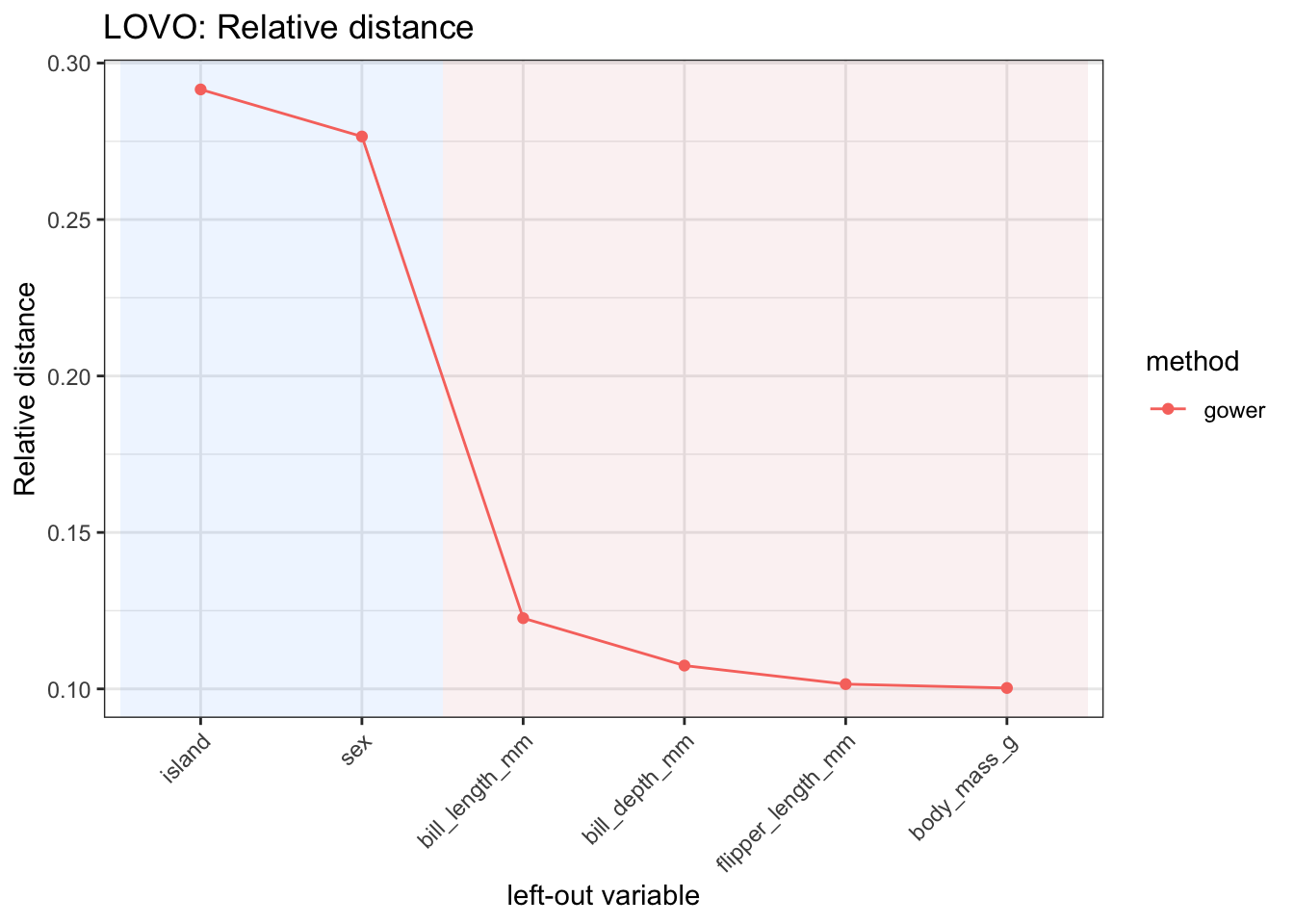
5 flipper_length_mm numeric 0.102The relative contribution of each variable can be visualized with autoplot().
lovo_gower$autoplot(
  metric = "relative_distance",
  reorder = TRUE
)
When response_used = FALSE, the response column is removed before computing distances. When response_used = TRUE, the response can be used by response-aware distance specifications, but it is still not treated as a predictor in the leave-one-variable-out loop.
lovo_response <- lovo_mdist(
  penguins_small,
  response = species,
  response_used = TRUE,
  preset = "u_dep"
)

lovo_response
MDistLOVO object
preset : u_dep
dims : 2
n_obs : 333
response used : TRUE
top vars:
# A tibble: 5 × 4
variable variable_type relative_distance mad_importance
<chr> <chr> <dbl> <dbl>
1 sex categorical 0.171 1.04
2 bill_length_mm numeric 0.166 1.01
3 bill_depth_mm numeric 0.166 1.00
4 body_mass_g numeric 0.166 1.00
5 flipper_length_mm numeric 0.166 1.0018 Inspecting method specifications
all_dist_method_specs() returns a table of distance specifications that can be used for benchmarking or sensitivity analysis.
specs <- all_dist_method_specs()

specs |>
  dplyr::select(
    spec_type,
    preset,
    method_cat,
    method_num,
    commensurable
  ) |>
  dplyr::slice_head(n = 10)
# A tibble: 10 × 5
spec_type preset method_cat method_num commensurable
<chr> <chr> <chr> <chr> <lgl>
1 preset euclidean <NA> <NA> NA
2 preset gower <NA> <NA> NA
3 preset hl <NA> <NA> NA
4 preset u_dep <NA> <NA> NA
5 preset u_indep <NA> <NA> NA
6 preset u_mix <NA> <NA> NA
7 preset dkss <NA> <NA> NA
8 preset gudmm <NA> <NA> NA
9 preset mod_gower <NA> <NA> NA
10 preset custom <NA> <NA> NA The same table can be passed to benchmark_mdist().
bench <- benchmark_mdist(
  penguins_small,
  response = species,
  specs = specs
)

bench |>
  dplyr::select(
    spec_type,
    preset,
    method_cat,
    method_num,
    commensurable,
    ok,
    error
  ) |>
  dplyr::slice_head(n = 10)
# A tibble: 10 × 7
spec_type preset method_cat method_num commensurable ok error
<chr> <chr> <chr> <chr> <lgl> <lgl> <chr>
1 preset euclidean <NA> <NA> NA TRUE <NA>
2 preset gower <NA> <NA> NA TRUE <NA>
3 preset hl <NA> <NA> NA TRUE <NA>
4 preset u_dep <NA> <NA> NA TRUE <NA>
5 preset u_indep <NA> <NA> NA TRUE <NA>
6 preset u_mix <NA> <NA> NA TRUE <NA>
7 preset dkss <NA> <NA> NA TRUE <NA>
8 preset gudmm <NA> <NA> NA TRUE <NA>
9 preset mod_gower <NA> <NA> NA TRUE <NA>
10 preset custom <NA> <NA> NA TRUE <NA>